用 Slidev 写 PPT 并使用 Github Pages 部署到自己的博客上
-
Prerequisites
- 基于 Github Pages 构建的静态个人博客网站
-
Steps
-
使用 Slidev 创建自己的 ppt 项目并上传到 Github 上的单独 Repository
-
配置开启仓库的 Github Pages
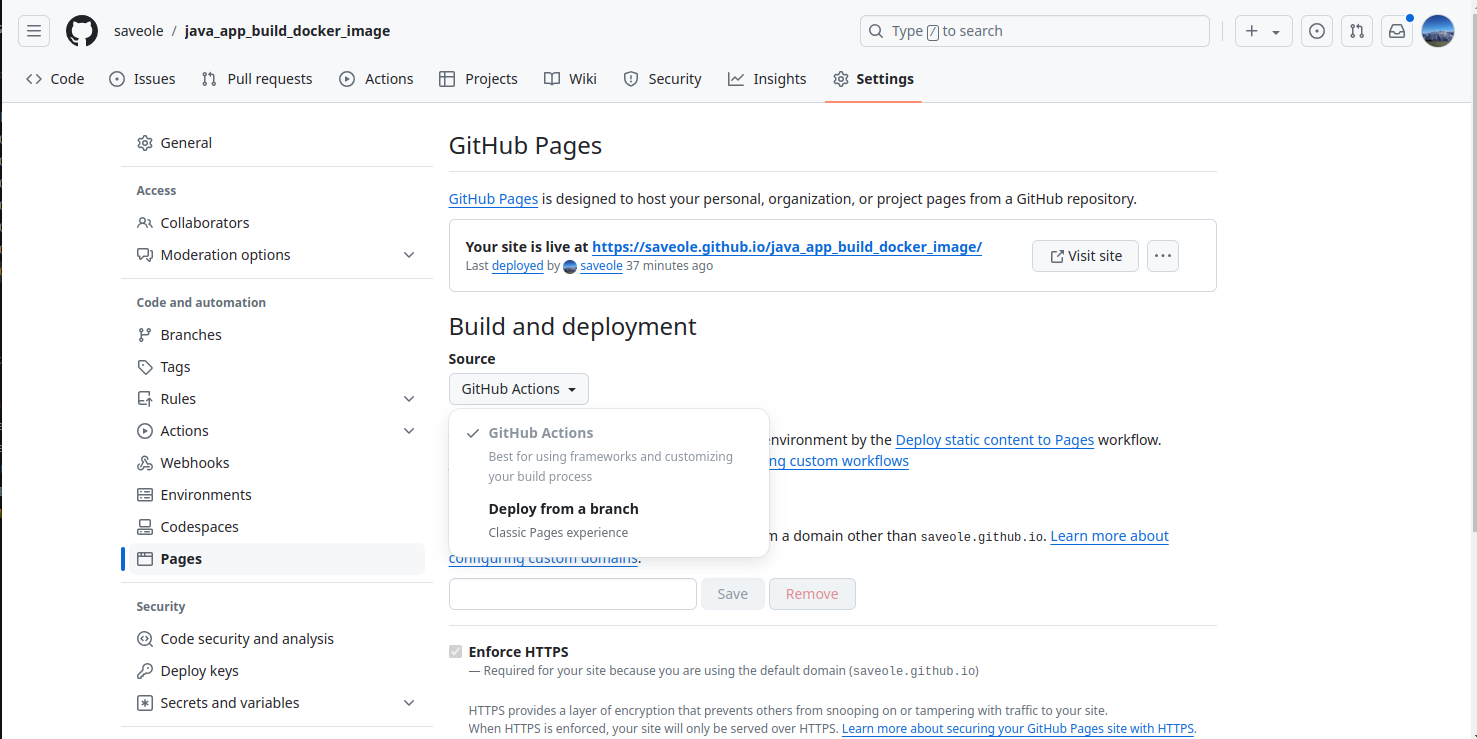
-
配置 Github Action
- 我的
.github/workflows/deploy.yml如下:
# Simple workflow for deploying static content to GitHub Pages name: Deploy static content to Pages on: # Runs on pushes targeting the default branch push: branches: ["main"] # Allows you to run this workflow manually from the Actions tab workflow_dispatch: # Sets permissions of the GITHUB_TOKEN to allow deployment to GitHub Pages permissions: contents: read pages: write id-token: write # Allow only one concurrent deployment, skipping runs queued between the run in-progress and latest queued. # However, do NOT cancel in-progress runs as we want to allow these production deployments to complete. concurrency: group: "pages" cancel-in-progress: false jobs: # Single deploy job since we're just deploying deploy: environment: name: github-pages url: ${{ steps.deployment.outputs.page_url }} runs-on: ubuntu-latest steps: - name: Checkout uses: actions/checkout@v4 - name: Setup node uses: actions/setup-node@v4 with: node-version: "lts/*" - name: Install dependencies run: npm install - name: Install slidev run: npm i -g @slidev/cli - name: Build run: slidev build --base /java_app_build_docker_image/ - name: Setup Pages uses: actions/configure-pages@v5 - name: Upload artifact uses: actions/upload-pages-artifact@v3 with: # Upload entire repository path: dist - name: Deploy to GitHub Pages id: deployment uses: actions/deploy-pages@v4 - 我的
-
-
Finish
- 写好 ppt 后,push 到仓库自动构建部署到自己的个人博客中,效果:Java 应用如何构建 Docker 镜像
-
Notes:
slidev build --base /java_app_build_docker_image/需要指定特定子路由的时候,最好将子路由名称和仓库名称保持一致我构建部署好的 ppt 地址在 Edge 浏览器下没有默认重定向到 /1 即 ppt 首页,但 FireFox 就可以,很奇怪,待我看看.- 使用的 Slidev 主题:academic
- 参考的 PPT: exploring-social-engineering-slides